
When a WAF Blocks the Browser, Not Just the IP
A practical look at client-side restrictions with UA Spectrum



Hello hackers 👋
During an authorized security test, a Web Application Firewall may suddenly start returning 403 Forbidden or Access Denied after detecting unusual requests. The first assumption is often that the public IP address has been blocked—but that is not always the full story.
A modern WAF or bot-management system can evaluate several signals at once:
- Public IP address and reputation
- Browser
User-Agent - Cookies and session state
- Request frequency and behavior
- Client Hints and browser characteristics
- TLS and device fingerprinting signals
This means a restriction can sometimes appear to follow the browser, even when the network connection has not changed.
What I Observed
During an authorized assessment, an unusual request caused the target to return an access-denied response. After that, ordinary pages on the same domain also returned 403.
Instead of changing everything at once, I tested one variable at a time. A harmless baseline request failed with the original browser identity but worked after applying a different User-Agent. That result suggested the client identity was one of the signals influencing the response.
It did not prove that the WAF relied only on the User-Agent. Cookies, session data, Client Hints, and other fingerprinting signals could still have contributed. The important lesson was to compare controlled requests and document the result carefully.
Introducing UA Spectrum
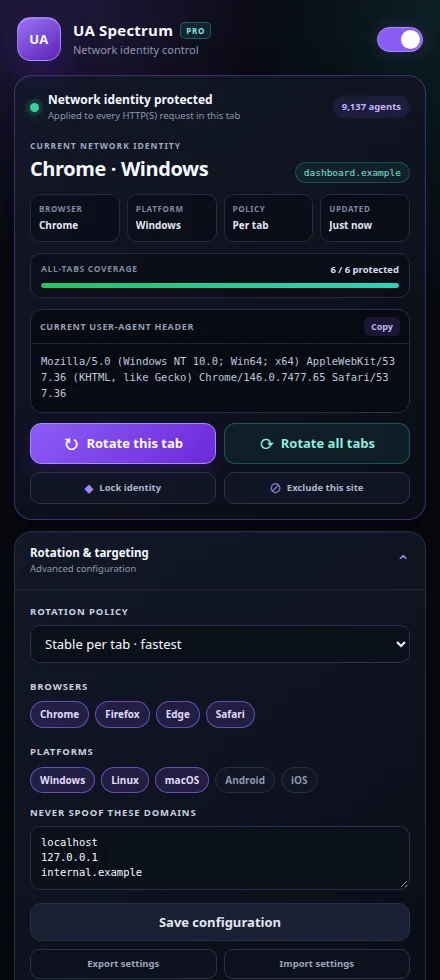
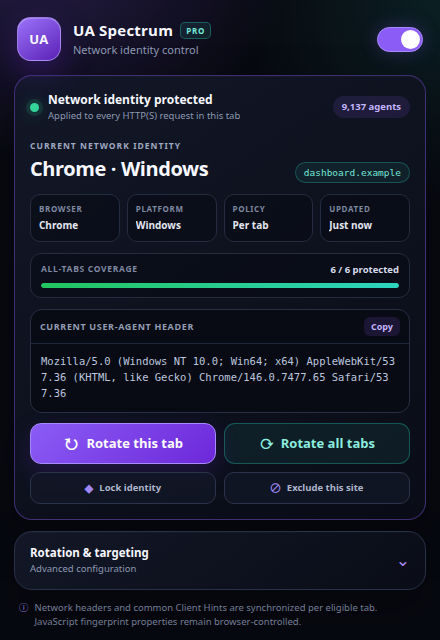
UA Spectrum is an open-source Chromium extension I built for controlled browser-identity testing. It assigns a realistic network identity to each eligible tab and makes it easy to compare how a server responds to different browser profiles.
Complete Feature Set
| Feature | What it does |
|---|---|
| 9,137 identities | Provides Chrome, Edge, Firefox, and Safari identities across Windows, Linux, macOS, Android, and iOS. |
| Per-tab isolation | Assigns a separate network identity to each eligible HTTP(S) tab. |
| Five rotation policies | Rotate on navigation, on tab focus, every 30 seconds, every 5 minutes, or remain stable per tab. |
| Identity lock | Preserves a selected tab identity during timers, navigation, focus changes, and all-tab rotation. |
| Single-tab rotation | Changes only the identity of the active tab. |
| Batch rotation | Rotates every eligible, unlocked tab in one operation. |
| Site exclusions | Excludes or includes the current hostname with one click. |
| Browser and platform filters | Limits rotation to the browsers and operating systems selected by the user. |
| Client Hint alignment | Aligns common Chromium Client Hints and removes contradictory hints for Firefox or Safari identities. |
| Health repair | Restores missing or stale rules without disturbing healthy tabs. |
| Live dashboard | Displays the active identity, hostname, browser, platform, coverage, rotation policy, and last change. |
| Import and export | Saves settings to readable JSON and validates imported configurations before applying them. |
| Master control | Enables the extension instantly or removes every UA Spectrum rule when disabled. |
| Local and private | Uses no analytics, telemetry, remote scripts, or runtime services. |
Rotation Modes
UA Spectrum offers five policies for different testing scenarios:
- Stable per tab — keeps one identity until you change it manually.
- Every navigation — rotates before each top-level navigation.
- When the tab gains focus — rotates when the active tab changes.
- Every 30 seconds — rotates eligible, unlocked tabs every 30 seconds.
- Every 5 minutes — provides slower timed rotation for longer sessions.
For reproducible research, Stable per tab is usually the best starting point. Automatic rotation is useful for controlled comparisons, but changing identities too often can produce inconsistent evidence or trigger additional protections.
——
Installation
- Download and extract the latest UA Spectrum release.
- Open
chrome://extensionsin a Chromium-based browser. - Enable Developer mode.
- Select Load unpacked.
- Choose the extracted
ua-spectrumfolder. - Pin the extension for quick access.
Privacy by Design
- No analytics or telemetry
- No remote scripts
- No cloud account required
- Settings remain in Chromium extension storage
- Tab assignments remain in session storage
- Export happens only when requested by the user
- Internal pages and excluded domains remain untouched
Final Thoughts
An access-denied response is not just an obstacle; it is also a useful signal. The goal is not to keep changing identities until a request succeeds. The goal is to understand which variable influenced the server’s decision and produce a result that another researcher can reproduce.
UA Spectrum was built to make that process controlled, visible, and easy to document.
Responsible use: Only test systems you own or have explicit permission to assess. Always respect program scope, rate limits, and disclosure requirements.
No comments yet